While developed and released to be a mid entry-level mobile phone, the Samsung S3500 is not your typical cheap-looking budget phone. This quad-band GPRS and EDGE-capable phone hides quite a number of tricks up its sleeve including a 2Megapixel camera, a music player, and FM radio.
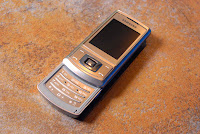 Reminiscent of the more expensive Samsung U900 Soul, it tries to present itself favorably with the slide interface and brushed aluminum fascia. It is solidly built with no hint of wobbling or squeaks on the slide mechanism.
 It has a 2-megapixel camera on the top part of the phone which has superb panorama, mosaic, burst modes together with the night shooting mode to compensate for its lack of flash. The S3500 comes standard with a microSD slot for up to 8GB of storage for images, videos, or music. The music player can sort songs by artist, album or genre and even keeps track of the most played songs.
 Although it doesn’t come with a standard 3.5mm headphone jack, it can wirelessly stream your tunes to your Bluetooth-capable headphones or car head unit. FM radio and music player can be easily controlled with the D-pad. JAVA apps and games are supported but unfortunately, all games included in the package are all demos.
 The Samsung S3500 is a looker on a budget. Though it's nothing original nor cutting-edge, it can count on some of that Soul or the Nokia 6500 slide charisma. The camera performance is nothing special either, but the music player and FM radio perform well. If they just added 3G capability like the oher phones in its price range, then this is definitely a steal at P6,500.
Ladies and gents, please sign the petition to stop this non-sense. Don't let Globe dictate what you should do with your connection -- if you're paying for 1Mbps, it's your right to use that for whatever reason it may be. Please sign even if you're not a subscriber of Globe so that other ISPs can see that we are united, as a country, to uphold Net Neutrality.
Sign the petition here.

Thousands of Globe subscribers are experiencing significant problems downloading from peer-to-peer networks including bit torrent. I am also a subscriber of Globe Broadband and from my normal D/L speed of 110kBps, I now only get around 15kBps.
From forums around the net, I read that plan 1Mbps is throttled at 20kBps, and plan 2Mbps, is at 40kBps (they use an advanced traffic-shaping hardware to do this). Others speculate that Globe will apply throttling if you reach your download cap -- 20GB a month.
Nobody from Globe has confirmed nor denied this crappy new system that they are implementing, so I hope this is only temporary. If this turns out to be a permanent BS, I'll surely look for a better ISP the soonest.
Please hit the comment button and share your story.
UPDATE: This is a scan of the contract of new subscribers. Looks like this will be permanent :(

UPDATE 2: Good news people! We can now bypass Globe's BS by using this as BT client. Enjoy! LINK
UPDATE 3: Still no word from Globe. And bad news, Thunder doesn't always work on all torrents. Tried using it using public trackers like TPB or TorrentBox, download doesn't even start. I'll experiment some more.
It seems that Nikon has again unveiled a new entry-level DSLR which was meant to replace the D40 but with features that are almost at par with mid-level digital SLR cameras. It boasts of video recording at 720p, and features similar to the highly regarded Nikon D90 (11AF Points!!!). Now that this DSLR is official (already posted in the CDSC website), let's take a look at its specs:
•New 2.7-in. 230k-dot Vari-angle monitor swings down approximately 90° and rotates 180°
•Nikon DX-format CMOS image sensor with 12.3 effective megapixels and Integrated Dust Reduction System
•Specially designed EXPEED image processing system
•One-touch access to Live View, which includes face priority AF and subject tracking AF
•D-SLR movie function: D-Movie, selectable from 320 x 216 pixels, 640 x 424 pixels or 1,280 x 720 pixels in AVI format
•19 Scene Modes that automatically adjust exposure, image processing, Active D-Lighting and other settings for superior image quality
•Scene Recognition System, utilizing 420-pixel RGB sensor, improves autofocus, auto exposure and auto white balance performance and is also integrated with the Face Detection System
•Active D-Lighting for smooth tone reproduction in high-contrast environments
•Multi-CAM 1000 autofocus sensor module featuring 11 AF points provides fast and precise autofocus coverage across the frame
•Picture Control System offers Portrait and Landscape options for more vibrant customized colors
•Extensive palette of in-camera Retouch Menus including several new retouch options such as Soft Filter and Color Outline
•Incredibly low-noise performance throughout a wide sensitivity range of ISO 200 to 3200; can be set to ISO 100 and ISO 6400 equivalents
•Viewfinder with approx. 95% frame coverage and an easy-to-view 17.9 mm eyepoint (at -1.0 m-1)
•Up to 4 fps continuous shooting
•Built-in pop-up flash with Nikon's original i-TTL flash control
•Multi-CAM 1000 autofocus sensor module featuring 11 AF points provides fast and precise autofocus coverage across the frame
•Highly efficient energy-saving design that allows approx. 510 images on a single charge of the Rechargeable Li-ion Battery EN-EL9a (CIPA standard, with AF-S DX NIKKOR 18-55mm f/3.5-5.6G VR and flash fired at full power once every other shot.)
•Compatible with HDMI (High-Definition Multimedia Interface) output
•Included Nikon ViewNX software makes browsing and organizing your images easy
•Optional photo-editing software Capture NX 2 allows quick and easy photo editing
•Lightweight compact body
The SRP is expected to be between the D60 and the D90 at around Php40,000 for the kit which includes an 18-55mm VR lens. Not bad for a feature-packed DSLR!
Here are the pics:


If you want to run iWork 09 or iLife 09 (I heard iLife 09 kicks butt!), you need the newest version of Leopard. I found out that iDeneb v1.4 (OSX 10.5.6) is out, so I'll try that out in the coming days and update the post below.
This is how to install the *best* OS in the world on a PC. If you're interested in doing so, you can just take note of the hardware I bought, go to Gilmore, and build your own Mac.
Getting the Software Needed
1. iDeneb v1.3 Leopard 10.5.5 (Google it!)
2. The DS3L Kit (contains all drivers needed for the DS3L series)
3. Kext Helper (already included in the package above)
Hardware List
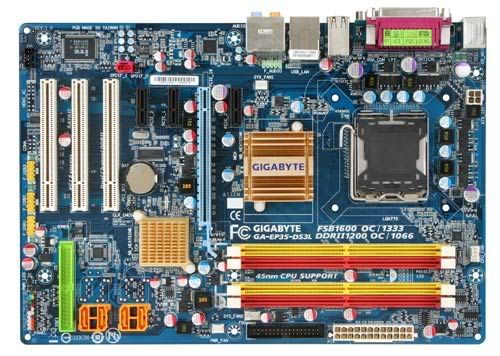
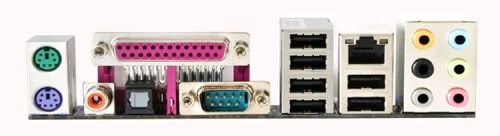
1. Motherboard: Gigabyte EP35-DS3L - P5,200
 The most important component of your Hack Pro is the motherboard. Many onboard features may not work under OSX if your motherboard is not supported.
After months of researching, I finally found the best board for this project -- the Gigabyte EP35-DS3L motherboard which is based on the Intel P35 + ICH9 Chipset. I got this for around P5,200 (~ $110), which is quite expensive for a year-old PC component. This board is pretty good if you're into overclocking and basic computer/gaming use. It has all-solid capacitors (capacitors bulge or leak over time, but these don't), 3 PCI slots for maximum upgradability, and an 8-channel Intel HD audio with optical/SPDIF output!
2. Processor: Intel Pentium Dual Core E5200 2.5GHz - P3,800
 Based on the 45nm manufacturing process, this dual core processor runs faster, cooler, and yields much higher overclock than normal manufacturing processes. I got mine running at 3.2GHz @ stock voltage.
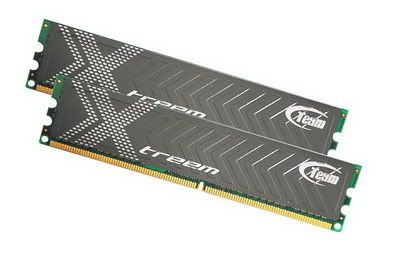
3. Memory: Team Xtreem Dark DDR2 800 2Gb (2x1GB) Dual Channel Kit - P1,900 I got this kit because of its overclocking capabilities, but if you're not into it, budget DDR2 800MHz RAMs will do.
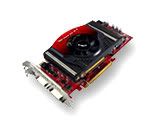
4. Video Card: Palit GeForce 9800GT 512MB Dual Heatpipe - P6,400
 This graphics chip fully supports Quartz Extreme in Leopard. if you're a gamer, this card is a must! If not, you can do with at least a 9500GT card.
5. Hard Drive: Any size. Just make sure it's SATA because you need to enable AHCI in the BIOS.
6. Any SATA DVD Drive
7. Any USB Keyboard and Mouse
8. A USB thumb drive to store all the drivers you downloaded earlier.
Installation
1. Download all the files above, burn iDeneb into a DVD (burn as image not as data), and save the unzipped DS3L Kit into your USB stick.
2. Go to the DS3L bios (press delete at the start-up screen), look for "Integrated Peripherals" and make sure the SATA Mode is set to AHCI. Also, under "Power Management", from S3 set it to S1, then press F10 and select yes and restart.
3. While at the start-up screen, press end to choose a boot device. Choose your DVD drive and wait for the iDeneb disc to boot.
4. Once asked by Darwin (Mac's version of DOS), boot the DVD in verbose mode by typing "-v" (without the ")
5. Wait for it to boot, select your language, then go to utilities, then disk utility.
6. Go to the "Erase" Tab, select your hard drive on the left, and format it to Mac OS Extended (Journaled). Wait for it to finish, then exit Disk Utility.
7. Now you're back to welcome screen. Click continue, select agree, then select the hard drive you wish to install OSX in, after that, click continue.
8. Click the customize button, then deselect everything except for the following: X11, Under FIX/SMBIOS, choose SMBIOS 800, under applications, choose all.
9. Install Leopard and wait for it to reboot.
10. After reboot, fix all the necessary components that don't work by using Kext Helper (already installed in the applications folder) and the drivers you downloaded earlier which you saved in the USB stick.
11. Enjoy your new Hack Pro! :)
Note: The DS3L board is a very popular Hackintosh board and if you get lost somewhere, I'm sure you can easily find the solution using Google. I hold no responsibility if your machine goes up in smoke (which is very unlikely to happen)!

 Reminiscent of the more expensive Samsung U900 Soul, it tries to present itself favorably with the slide interface and brushed aluminum fascia. It is solidly built with no hint of wobbling or squeaks on the slide mechanism.
 It has a 2-megapixel camera on the top part of the phone which has superb panorama, mosaic, burst modes together with the night shooting mode to compensate for its lack of flash. The S3500 comes standard with a microSD slot for up to 8GB of storage for images, videos, or music. The music player can sort songs by artist, album or genre and even keeps track of the most played songs.
 Although it doesn’t come with a standard 3.5mm headphone jack, it can wirelessly stream your tunes to your Bluetooth-capable headphones or car head unit. FM radio and music player can be easily controlled with the D-pad. JAVA apps and games are supported but unfortunately, all games included in the package are all demos.
 The Samsung S3500 is a looker on a budget. Though it's nothing original nor cutting-edge, it can count on some of that Soul or the Nokia 6500 slide charisma. The camera performance is nothing special either, but the music player and FM radio perform well. If they just added 3G capability like the oher phones in its price range, then this is definitely a steal at P6,500.